

목차
[WAT-S024] 로터리 엔코더 모듈
본 제품은 [WAT-SK114]중요한 아두이노 센서키트(초급) 중 24번째 모듈로 Rotary encoders모듈입니다.

핀 번호
| 번호 | 핀명 | I/O | 기능 |
|---|---|---|---|
| 1 | GND | GND | GND |
| 2 | + | VCC | VCC |
| 3 | SW | SWITCH | 스위치 눌림 |
| 4 | DT | A | OUTA |
| 5 | CLK | B | OUTB |
WAT-Arduino128 예제
핀 연결
| 번호 | I/O | WAT-Arduino128 |
|---|---|---|
| 1 | GND | GND |
| 2 | + | VCC |
| 3 | SW | PA0 |
| 4 | DT | PA1 |
| 5 | CLK | PA2 |
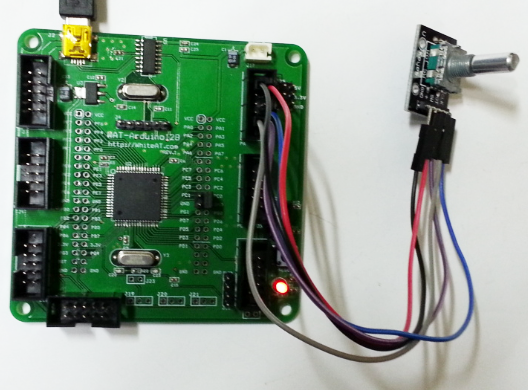
소스코드
최신 소스코드는 [파일]=>[예제]=> [WhiteAT]=> [Sensor37] => [24_RotaryEncoders] 에 있으며
라이브러리는 아두이노 개발환경 을 참조하세요
/*
 중요한 아두이노 센서키트 37종 예제 중 24번째
 WAT-Arduino128 과 로터리 인코더 예제입니다.

 WAT-Arduino128 : https://kit128.com/goods/view?no=64
 37종 센서: https://kit128.com/goods/view?no=114

 출처: http://whiteat.com/Arduino
*/

int totalCount = 0;
int S = PA0; // Switch
int pinA = PA1;
int pinB = PA2;

// 프로그램 시작 - 초기화 작업
void setup()
{
 Serial.begin(115200); // 시리얼 통신 초기화
 Serial.println("Arduino Examples - Rotary Encoders");
 Serial.println(" https://docs.whiteat.com/?p=1265");
 pinMode(S, INPUT);
 pinMode(pinA, INPUT);
 pinMode(pinB, INPUT);
 digitalWrite(S, HIGH);
}

int nowCnt = 0;
void loop()
{
 if (LOW == digitalRead(S))
 {
 Serial.println("Clear"); // 감지
 delay(200);
 totalCount = 0;
 }
 else
 {
 //Serial.print("."); // 없음
 }

 nowCnt = getValue();

 if (nowCnt != 0)
 {
 totalCount += nowCnt;
 Serial.println(totalCount);
 }

}

int oldA = LOW;
int oldB = LOW;

int getValue()
{
 int rValue = 0;
 int A = digitalRead(pinA);
 int B = digitalRead(pinB);

 if (A != oldA || B != oldB)
 {
 if (oldA == LOW && A == HIGH)
 {
 if (oldB == HIGH) rValue = 1;
 else rValue = -1;
 }
 }
 oldA = A;
 oldB = B;
 return rValue;
}
결과 화면
스위치를 시계방향으로 돌리면 카운터 증가, 반시계방향으로 돌리면 카운터가 감소합니다.

Arduino UNO R3 예제
핀 연결
| 번호 | I/O | UNO R3 |
|---|---|---|
| 1 | GND | GND |
| 2 | + | VCC |
| 3 | SW | 2 |
| 4 | DT | 3 |
| 5 | CLK | 4 |

소스코드
최신 소스코드는 [파일]=>[예제]=> [WhiteAT UNO]=> [Sensor37] => [24_RotaryEncoders] 에 있으며
라이브러리는 아두이노 개발환경 을 참조하세요
/*
 중요한 아두이노 센서키트 37종 예제 중 24번째
 UNO 와 로터리 인코더 예제입니다.

 UNO R3 : https://kit128.com/goods/view?no=337
 37종 센서: https://kit128.com/goods/view?no=114

 출처: http://whiteat.com/Arduino

*/

int totalCount = 0;
int S = 2; // Switch
int pinA = 3;
int pinB = 4;

// 프로그램 시작 - 초기화 작업
void setup()
{
 Serial.begin(115200); // 시리얼 통신 초기화
 Serial.println("Arduino Examples - Rotary Encoders");
 Serial.println(" https://docs.whiteat.com/?p=1265");
 pinMode(S, INPUT);
 pinMode(pinA, INPUT);
 pinMode(pinB, INPUT);
 digitalWrite(S, HIGH);
}

int nowCnt = 0;
void loop()
{
 if (LOW == digitalRead(S))
 {
 Serial.println("Clear"); // 감지
 delay(200);
 totalCount = 0;
 }
 else
 {
 //Serial.print("."); // 없음
 }

 nowCnt = getValue();

 if (nowCnt != 0)
 {
 totalCount += nowCnt;
 Serial.println(totalCount);
 }

}

int oldA = LOW;
int oldB = LOW;

int getValue()
{
 int rValue = 0;
 int A = digitalRead(pinA);
 int B = digitalRead(pinB);

 if (A != oldA || B != oldB)
 {
 if (oldA == LOW && A == HIGH)
 {
 if (oldB == HIGH) rValue = 1;
 else rValue = -1;
 }
 }
 oldA = A;
 oldB = B;
 return rValue;
}
결과 화면
스위치를 시계방향으로 돌리면 카운터 증가, 반시계방향으로 돌리면 카운터가 감소합니다.
제품 구매
[WAT-SK114]중요한 아두이노 센서키트(초급)은 https://kit128.com/goods/view?no=114 에서
[WAT-S024] 엔코더 로터리모듈은 https://kit128.com/goods/view?no=424 에서 구매하실 수 있습니다.
