

목차
[WAT-323] SD-CARD Module
아두이노, ATMEGA, PIC 등에 연결하여 사용할 수 있는 SD-CARD 모듈입니다.

핀 번호
| 번호 | 핀명 | 기능 |
|---|---|---|
| 1 | GND | GROUND |
| 2 | 3.3V | 3.3V Out |
| 3 | 5V | 5V |
| 4 | CS | Chip Select |
| 5 | MOSI | MOSI |
| 6 | SCK | SCK |
| 7 | MISO | MISO |
| 8 | GND | GND |
Arduino UNO R3 예제
핀 연결
| 번호 | WAT-323 | Arduino UNO R3 |
|---|---|---|
| 1 | GND | GROUND |
| 2 | 3.3V | x |
| 3 | 5V | 5V |
| 4 | CS | 4 |
| 5 | MOSI | 11 |
| 6 | SCK | 13 |
| 7 | MISO | 12 |
| 8 | GND | GND |

소스코드
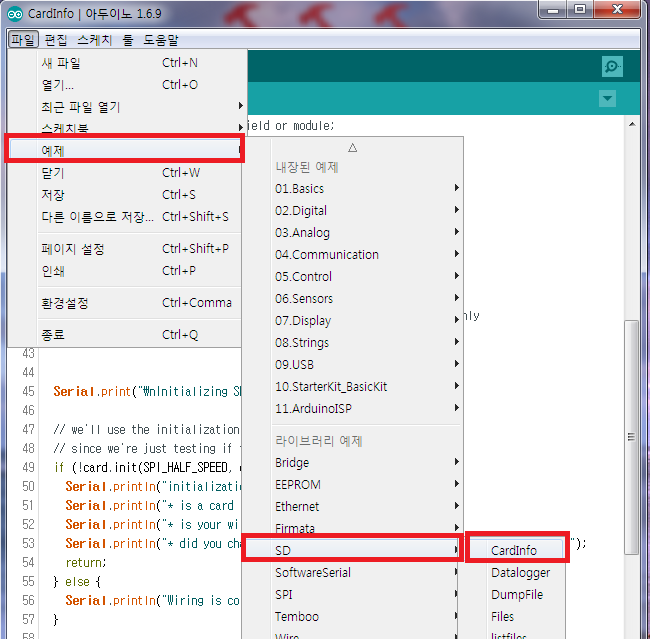
최신 소스코드는 [파일]=>[예제]=>[SD]=> [FileInfo] 에 있으며
라이브러리는 아두이노 개발환경 (https://docs.whiteat.com/?page_id=5449) 을 참조하세요
// include the SD library:
#include <SPI.h>
#include <SD.h>

// set up variables using the SD utility library functions:
Sd2Card card;
SdVolume volume;
SdFile root;

// change this to match your SD shield or module;
// Arduino Ethernet shield: pin 4
// Adafruit SD shields and modules: pin 10
// Sparkfun SD shield: pin 8
const int chipSelect = 4;

void setup() {
  // Open serial communications and wait for port to open:
  Serial.begin(115200);
  while (!Serial) {
    ; // wait for serial port to connect. Needed for native USB port only
  }


  Serial.print("\nInitializing SD card...");

  // we'll use the initialization code from the utility libraries
  // since we're just testing if the card is working!
  if (!card.init(SPI_HALF_SPEED, chipSelect)) {
    Serial.println("initialization failed. Things to check:");
    Serial.println("* is a card inserted?");
    Serial.println("* is your wiring correct?");
    Serial.println("* did you change the chipSelect pin to match your shield or module?");
    return;
  } else {
    Serial.println("Wiring is correct and a card is present.");
  }

  // print the type of card
  Serial.print("\nCard type: ");
  switch (card.type()) {
    case SD_CARD_TYPE_SD1:
      Serial.println("SD1");
      break;
    case SD_CARD_TYPE_SD2:
      Serial.println("SD2");
      break;
    case SD_CARD_TYPE_SDHC:
      Serial.println("SDHC");
      break;
    default:
      Serial.println("Unknown");
  }

  // Now we will try to open the 'volume'/'partition' - it should be FAT16 or FAT32
  if (!volume.init(card)) {
    Serial.println("Could not find FAT16/FAT32 partition.\nMake sure you've formatted the card");
    return;
  }


  // print the type and size of the first FAT-type volume
  uint32_t volumesize;
  Serial.print("\nVolume type is FAT");
  Serial.println(volume.fatType(), DEC);
  Serial.println();

  volumesize = volume.blocksPerCluster();    // clusters are collections of blocks
  volumesize *= volume.clusterCount();       // we'll have a lot of clusters
  volumesize *= 512;                            // SD card blocks are always 512 bytes
  Serial.print("Volume size (bytes): ");
  Serial.println(volumesize);
  Serial.print("Volume size (Kbytes): ");
  volumesize /= 1024;
  Serial.println(volumesize);
  Serial.print("Volume size (Mbytes): ");
  volumesize /= 1024;
  Serial.println(volumesize);


  Serial.println("\nFiles found on the card (name, date and size in bytes): ");
  root.openRoot(volume);

  // list all files in the card with date and size
  root.ls(LS_R | LS_DATE | LS_SIZE);
}


void loop(void) {

}
결과 화면
SD 카드 정보를 출력하고 SD카드 안의 폴더(디렉토리)와 파일명을 출력합니다.

제품 구매
WAT-323 SD Card Module는 https://kit128.com/goods/view?no=323 에서
Arduino UNO R3 호환 보드는 https://kit128.com/goods/view?no=337 에서 구매하실 수 있습니다.
